




At pr-ide, we occasionally come across things at work that are still quite useful. Small tools, for example, that save you from having to do a tedious task.
We affectionately call them our “byproducts.” And we make them available. It’s basically a digital “free stuff” box right outside the agency’s door. Only without the broken toaster and the question of whether anyone still lives there.
In the box this time: a Markdown importer for WordPress.
Anyone who writes in Markdown knows the tedious task that follows in the WordPress editor: adjusting headings, rearranging lists, and checking formatting. Did you actually want to publish an article, or were you training to become a paragraph specialist?
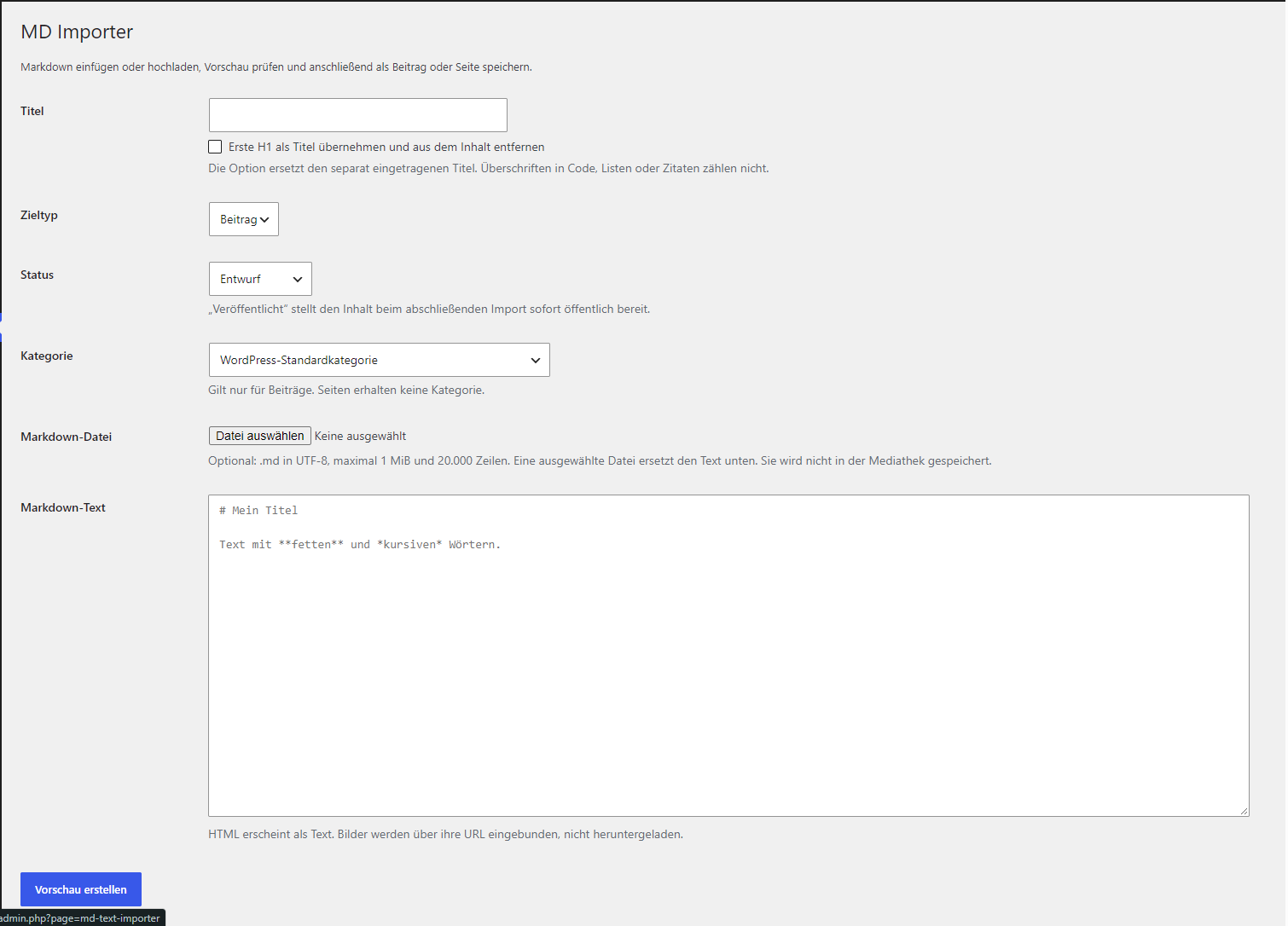
Our little plugin handles the conversion. Enter your Markdown, check the preview, and save it as a post or page. Done.
Here’s what you can do:
- Paste text or upload an
.mdfile. Whatever you have on hand. - Enter the title yourself or use the first H1 heading. The copied headline is removed from the content so it doesn’t appear there again.
- Create a post or a page. You can also select a category for posts.
- Save as a draft or publish immediately. Depending on whether someone else needs to proofread it or if the text is ready to be sent out.
- Check out the preview first. You can also check the generated HTML.
The standard Markdown elements are supported: headings from H1 to H6, paragraphs, bold, italics, links, images, lists, quotes, horizontal lines, and code. In other words, some of the things that keep a text from looking like a very long text message.
The installation is straightforward:
- Download the ZIP file.
- In WordPress, go to Plugins → Install → Upload Plugin.
- Select the ZIP file, install it, and activate it.
- Click “MD Importer” in the admin menu on the left.
The package contains a PHP file and a README. The plugin doesn’t require any additional libraries or CDNs. The instructions are included. You can read them. They’re actually helpful.
Even a byproduct undergoes a few thorough checks with us: The plugin verifies permissions, uses WordPress nonces, and cleans up titles and generated HTML. Without publishing permissions, nothing will be published this way either. The preview does not create a post yet—it is only saved during the subsequent import.
There’s a bit of fine print, after all—we’re still in Germany: The importer supports the basic Markdown features described here. Tables, to-do lists, and footnotes are not processed specifically. Images remain embedded via their URLs and are not automatically moved to the media library. And, of course, your theme may still have a say in the final display.
The PHP syntax check, 94 automated checks, and four upload tests have been passed. A comprehensive test in a live WordPress installation is still pending but is expected to be successful. For the first round, however, we recommend using a test environment.
Download MD Text Importer 1.0.0 as a ZIP file
Help yourself. If this tool saves you a few steps, then our “byproduct” has already found a pretty useful new purpose.






Leave A Comment
You must be logged in to post a comment.